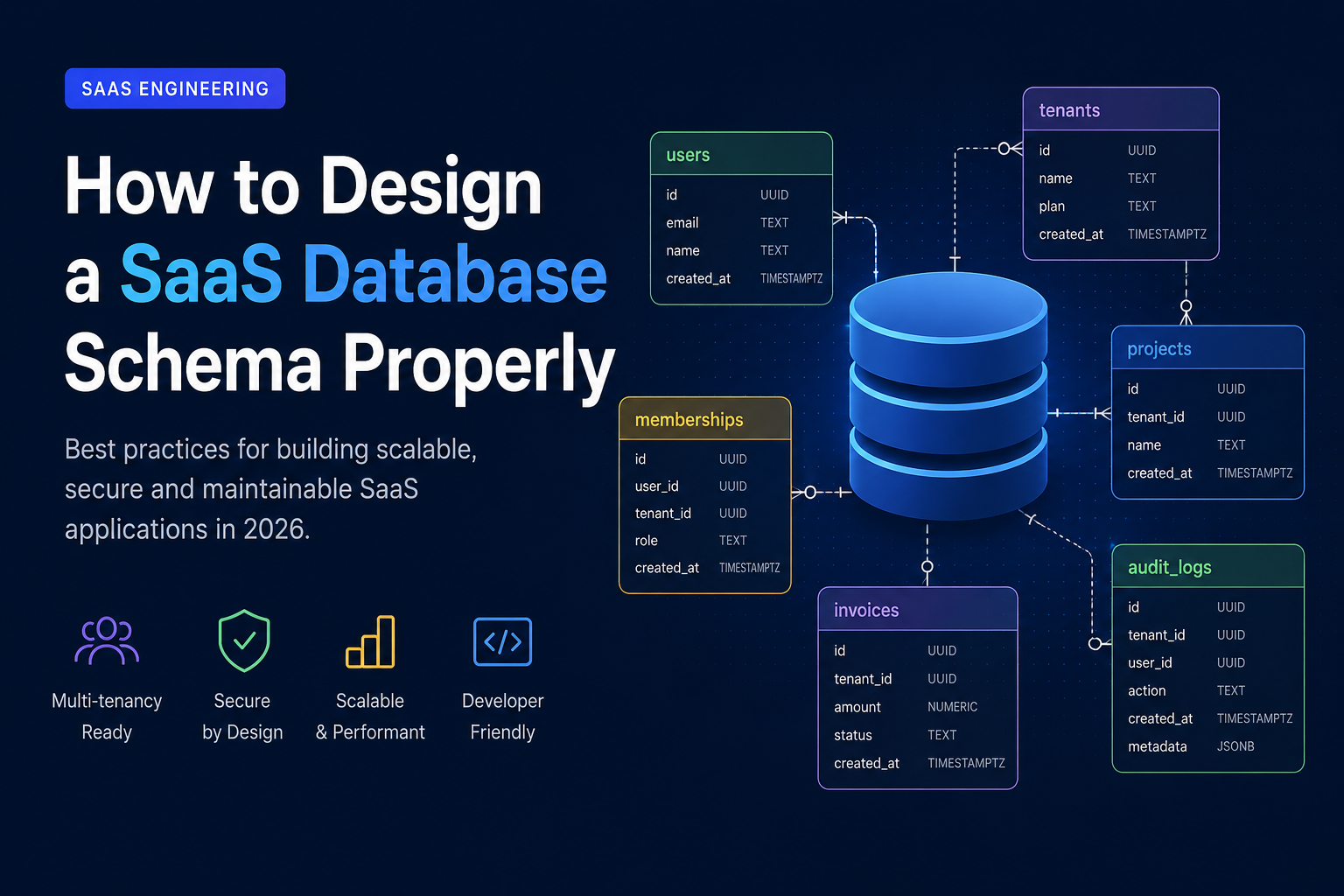
Designing a SaaS database schema is one of the most critical decisions you make when building a product. Get it wrong, and you’ll suffer from scaling issues, messy migrations, and painful rewrites. Get it right, and your system will scale cleanly with minimal friction.
This guide breaks down how to design a SaaS database schema properly using modern best practices (especially for PostgreSQL-based stacks like Supabase, Node.js, and TypeScript backends).
Why SaaS database design is different
A SaaS product is not a simple app database. You are not just storing data—you are managing:
Multiple customers (tenants)
Data isolation and security
Scaling over time
Subscription and billing states
Feature access control (plans, limits)
The biggest difference is multi-tenancy. Everything revolves around it.
Step 1: Choose your multi-tenant architecture
There are 3 common approaches:
1. Shared database, shared schema (most common)
All tenants share the same tables, separated by a tenant_id.
Example:
users table
projects table
invoices table
All includetenant_id
Pros:
Easy to build
Cheap
Scales well for most startups
Cons:
Requires strict security rules
Data isolation is your responsibility
👉 This is what most modern SaaS startups should use.
2. Shared database, separate schemas
Each tenant gets its own schema.
Pros:
Better isolation
Easier per-tenant customization
Cons:
Hard migrations
Operational complexity
3. Separate database per tenant
Each customer has their own database.
Pros:
Maximum isolation
Enterprise-grade
Cons:
Expensive
Hard to maintain
Overkill for 99% of SaaS apps
Step 2: The golden rule — every table must support tenancy
If you're using shared schema (recommended), every business table should include:
tenant_id UUID NOT NULLAnd indexed:
CREATE INDEX idx_projects_tenant_id ON projects(tenant_id);This is non-negotiable.
Step 3: Design around your core domain, not features
Bad schema design = feature-based tables
Good schema design = domain-based structure
Bad example:
users
user_settings
user_notifications
user_permissions
This creates tight coupling and duplication.
Good example:
users
workspaces (or tenants)
projects
memberships
roles
Think in business objects, not UI screens.
Step 4: Use a proper tenancy model
A scalable SaaS structure usually looks like this:
Core tables:
tenants
Represents the customer/company.
id
name
plan
created_at
users
Global identity (important!)
id
email
name
memberships
Connects users to tenants.
user_id
tenant_id
role
👉 This is critical: users should NOT belong directly to a tenant.
Step 5: Always normalize first, optimize later
Early-stage founders often denormalize too soon.
Start clean:
Avoid duplicated data
Use foreign keys properly
Keep relations explicit
Only denormalize when:
You hit performance issues
You have proven query bottlenecks
Premature optimization = future pain.
Step 6: Plan for permissions early (this is where most SaaS apps fail)
You will need:
Roles (admin, member, viewer)
Permissions (read, write, delete)
Feature flags (based on plan)
Example structure:
roles
id
name
permissions
id
key (e.g. "project:create")
role_permissions
role_id
permission_id
Step 7: Indexing strategy (don’t ignore this)
At minimum, index:
all
tenant_idcolumnsall foreign keys
frequently queried filters
Example:
CREATE INDEX idx_memberships_tenant_user
ON memberships(tenant_id, user_id);
If you don’t do this early, scaling will hurt.
Step 8: Soft deletes instead of hard deletes
Most SaaS apps should avoid hard deletes.
Use:
deleted_at TIMESTAMP NULL
Why:
Auditability
Recovery
Safer billing logic
Step 9: Keep audit logs from day one
Add an audit table early:
audit_logs
- id
- tenant_id
- user_id
- action
- entity_type
- entity_id
- metadata JSONB
- created_at
This becomes critical for enterprise clients later.
Step 10: Design for migrations, not perfection
Your schema WILL change.
So:
Use proper migration tools (Prisma / Knex / Drizzle / Supabase migrations)
Avoid manual DB edits
Version everything
Common mistakes (this is where most SaaS apps break)
❌ Not using tenant isolation everywhere
One missing tenant_id = data leak risk
❌ Mixing auth users with business users
This causes scaling and permission nightmares
❌ Overengineering early
Microservices, CQRS, event sourcing — unnecessary for MVP
❌ No indexing strategy
Your app “works” until it suddenly doesn’t
Recommended SaaS database stack (practical)
If you're building today:
PostgreSQL (Supabase or self-hosted)
Prisma / Drizzle ORM
Redis (optional caching layer)
JSONB for flexible metadata
This stack is enough for 90% of SaaS products.
Final thoughts
A SaaS database schema is not about complexity—it’s about discipline.
If you follow these principles:
strong tenancy model
clean domain design
proper indexing
auditability
migration discipline
…you will avoid 80% of scaling problems startups usually face.
Want help building your SaaS architecture?
If you're building a SaaS product and want a production-ready database + backend architecture (PostgreSQL, NestJS, or Next.js stack), I can help you design it from scratch.